Simple: start with what viewers should see
Starting something new used to mean an empty canvas in a full editor. Now the first thing is a question — what should viewers see? — and the editor opens only once there is something in it.
The library is the first question
The start sits on the projects page, under the ways in. Its first question is the whole library, laid out exactly as the Templates page lays it out: search, a chip for each category, and 372 templates you can hover to play.
Every card says how far Simple can take it. Edit steps means its motion, its length and each step can be changed. Quick edit means its words and pictures change, and it moves the way the template made it. Expert edit means its words are part of its motion, so they are changed in the full editor. Seventeen templates have steps today; most of the rest are Quick edit.
Choose one and the library folds away. What Create will make plays large on the left, with a Change template button under it if you want to look again.
Make it yours, then when and how long
Two questions sit beside the preview. Make it yours takes your YouTube channel — paste its address and Import channel puts the name, handle, avatar and subscriber count into the template — or Write it yourself, if you would rather type the words. A lookup that fails offers the second way instead of stopping.
When and how long sets where it starts, from zero to fifty seconds, and how long it stays, from half a second to thirty. For a template with steps you also choose its motion — Subtle, Balanced or Energetic — and whether it brings matching sounds, which are off unless you ask.
The line at the bottom says exactly what will happen, down to the second it appears and the second it leaves. Create makes it, opens the editor in Simple, and the whole thing is one step of undo.
In the editor, the steps are on the timeline
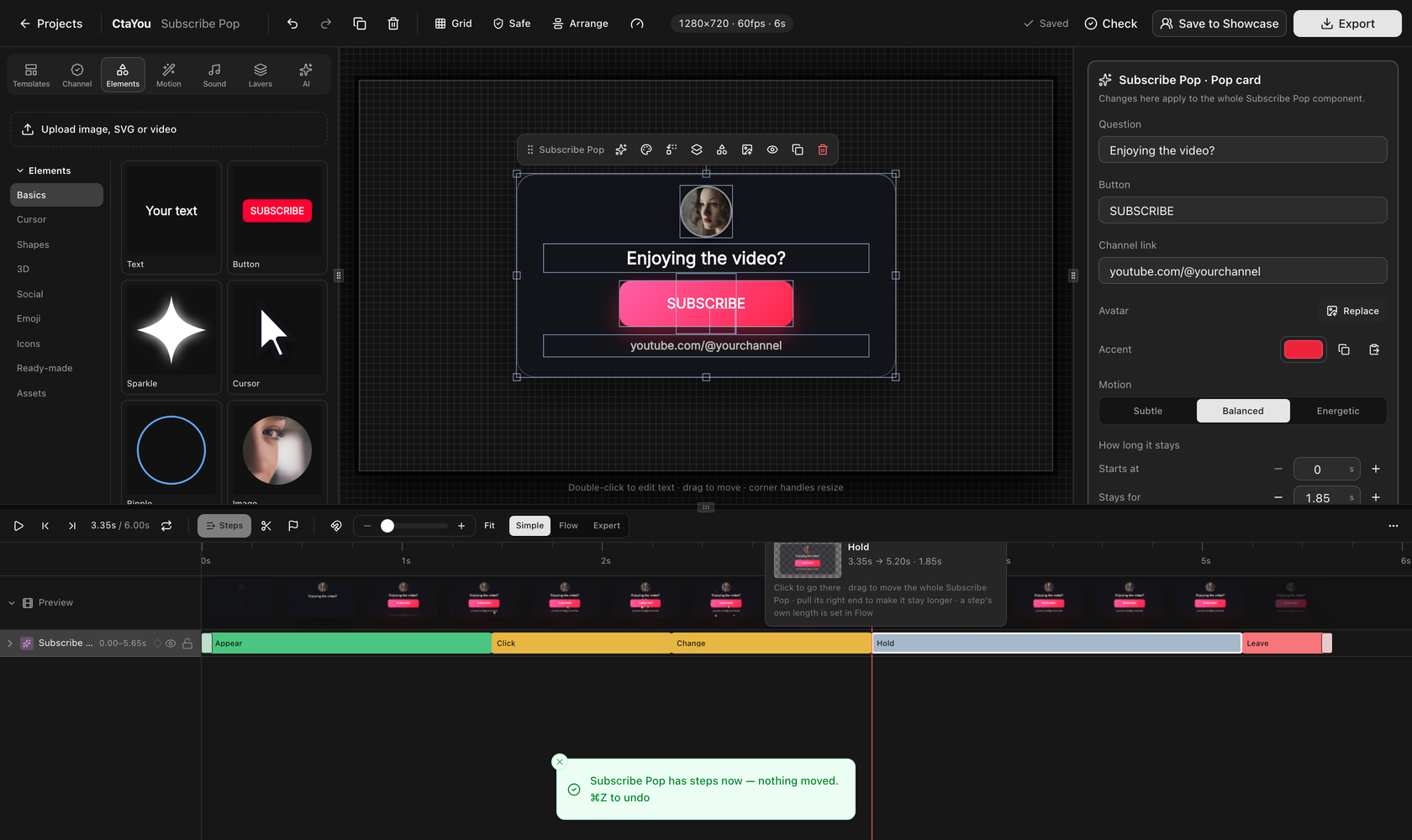
A template with steps arrives as one component rather than a pile of layers. Its steps sit in a row along the timeline — appear, click, change, hold, leave — and the panel on the right holds its words, its colours and its motion. A change there applies to the whole component, and each control has its own Reset.
Quick edit templates open to their words and pictures straight away, with Replace for each picture. Anything Simple does not reach is one click away in Expert, and nothing done in Simple is lost when you go there.
Your projects have a tab of their own
The projects you have already made moved to My projects, headed Continue where you left off, forty-eight to a page with Show more. The projects page is for starting; that tab is for carrying on.
Questions
- Can I still start from an empty canvas?
- Yes. Start blank and Open Expert sit beside the question on the projects page. Both make an empty 1280×720 project; one opens it in Simple, the other in the full editor.